

Managing Your Apartment's Free Wi-Fi
Many apartments with free wifi offer a great convenience, letting you connect to the internet right away. But how do you manage shared Wi-Fi to keep your devices secure and your online activity private?
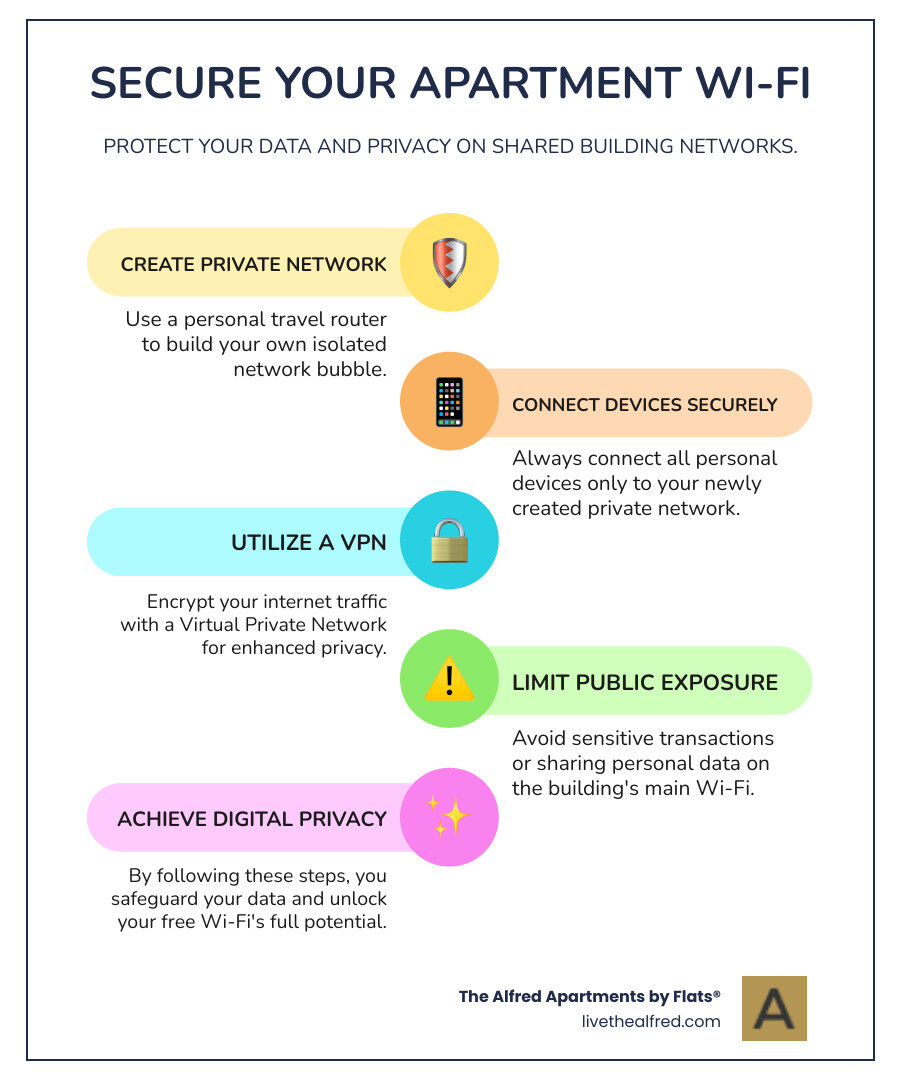
Here's how to manage shared Wi-Fi effectively:
- Create your own private network using a personal travel router.
- Connect all your personal devices to your private network.
- Use a Virtual Private Network (VPN) for extra security.
- Avoid sharing sensitive information directly on the building's public network.
Internet access has become a basic utility, and Wi-Fi is almost universally how we connect. Apartments that include free Wi-Fi are increasingly popular, as residents often seek this as a top amenity. It means you can stream, work, and connect without needing to set up a new internet plan.
However, shared Wi-Fi networks in apartment buildings come with potential security risks. Connecting your devices to a network shared with many strangers isn't ideal. It can lead to privacy concerns and potential performance issues if not managed properly.
This guide will show you how to truly open up the potential of your apartment's free Wi-Fi. We’ll help you steer the benefits while protecting your digital privacy and security. The goal is to create a secure online environment within your apartment, making the most of this modern amenity.
The Pros and Cons of Building-Wide Wi-Fi
When considering apartments with free wifi, it's important to weigh both the significant advantages and the potential drawbacks. On the one hand, the convenience and immediate connectivity are undeniable benefits that improve tenant satisfaction and can even impact property value. On the other hand, shared networks introduce unique challenges, particularly concerning security and performance.
From a tenant's perspective, having Wi-Fi included in the rent or as a complimentary amenity is a huge plus. It means we don't have to deal with the hassle of setting up an internet account, scheduling installations, or waiting for service activation. We can move in and be online almost instantly, which is especially appealing in today's world where immediate access to information and entertainment is expected. This amenity has become so fundamental that it's increasingly seen as a basic utility, much like water or electricity. In fact, users frequently seek apartment buildings with the best amenities, and Wi-Fi consistently ranks as one of the top features residents desire.
For landlords and property managers, offering managed Wi-Fi can be an intelligent strategy. It serves as a competitive perk that attracts more tenants and can justify higher rental values. Providing Wi-Fi included in the rent allows for coordinated installation and configuration across the entire building, which can maximize coverage and throughput for everyone. This proactive management prevents the "RF havoc" that can arise when numerous tenants bring in their own Wi-Fi routers, leading to signal interference and degraded performance for everyone. A well-managed, building-wide Wi-Fi system ensures a consistent and reliable internet experience, contributing significantly to tenant satisfaction.
However, there are also drawbacks. The primary concern revolves around security and privacy on shared networks. When multiple users share the same network, even if it's within a building, there's an inherent risk. Without proper management and tenant education, these networks can become vulnerable. Performance issues can also arise if the network isn't adequately provisioned for the number of users and their demands, leading to slower speeds or inconsistent connections. Furthermore, for landlords, providing Wi-Fi means taking on responsibility for its use, including potential legal liabilities for illegal activities like unauthorized downloads. This can even put the landlord's internet account at risk of being shut down or permanently banned by the internet provider if tenant misuse is not addressed.

The Convenience Factor: Why Renters Seek Included Internet
The appeal of apartments with free wifi is largely driven by convenience. Imagine moving into your new home and instantly being able to browse the web, stream your favorite shows, or connect with friends and family without any setup delays. This "move-in ready" internet is a significant draw for many renters.
We understand that setting up new utility accounts can be tedious. With included Wi-Fi, that's one less thing to worry about. You're immediately connected, whether it's for work, entertainment, or simply navigating your new neighborhood. This instant connectivity is not just a luxury; it's a practical necessity for many of us.
Furthermore, free Wi-Fi lifts an apartment building's amenity appeal. It signals a modern, forward-thinking property that understands the needs of its residents. This is particularly true in luxury apartments for rent and new developments, where high-speed, reliable internet is no longer just a bonus but an expected standard. It saves residents the monthly cost and administrative burden of managing their own internet service, making the overall living experience smoother and more integrated.
The Hidden Risks of Shared Apartment Networks
While the convenience of shared Wi-Fi is appealing, we must also acknowledge the hidden risks. Connecting any device to a network filled with strangers is, frankly, a terrible idea without taking precautions. These networks, if unmanaged or improperly secured, can pose significant security and privacy concerns.
One of the main issues is the potential for snooping. On a shared network, if proper network isolation isn't implemented, other users on the same network could potentially access your devices, see your online activity, or even intercept sensitive data if it's not encrypted. This includes everything from personal files to login credentials if you're not careful.
Unmanaged Wi-Fi installations in multi-unit dwellings can lead to a host of problems. When tenants bring in their own routers without coordination, it creates a cacophony of overlapping Wi-Fi signals, leading to radio frequency (RF) interference. This interference can degrade network performance for everyone, resulting in slower speeds, dropped connections, and overall frustration. It’s like everyone trying to shout over each other in a crowded room, making it hard for anyone to be heard clearly.
Moreover, a building that provides Wi-Fi without robust security measures might inadvertently create an environment ripe for performance issues. If the network is not designed to handle the collective bandwidth demands of all residents streaming, gaming, and working simultaneously, it can quickly become congested and unreliable. This is why a well-planned, professionally managed network is crucial to mitigate these risks and ensure a smooth experience for all. You can find more info about our FAQs on property management and resident services.
How to Create Your Own Secure Private Network
Given the inherent risks of shared Wi-Fi, the smartest move we can make is to create our own secure private network within our apartment. This effectively builds a personal network bubble, isolating our devices from the main building network and providing an essential layer of security and privacy. Think of it as having your own locked room within a larger, shared space.
This approach allows us to enjoy the benefit of included Wi-Fi while mitigating the security and performance concerns. It ensures that our smart home devices, personal computers, and mobile phones are connected to a network that only we control and can secure with our own strong passwords and encryption.

Choosing Your Hardware: Travel Routers and Wireless Bridges
To create your private network, you'll need a piece of hardware that can connect to the building's Wi-Fi and then broadcast its own, separate Wi-Fi network. The most common and effective tools for this are travel routers or wireless bridges.
A travel router is a compact device designed for this exact purpose. It connects to an existing Wi-Fi network (in this case, your apartment building's free Wi-Fi) and then creates a new, private Wi-Fi network for your devices. This means all your laptops, phones, smart devices, and gaming consoles connect to your travel router, and the travel router handles the connection to the building's network. This setup effectively "hides" your devices from others on the main building network, as they only see the travel router, not your individual gadgets. Devices like GLi-net routers and the TP-Link N300 Wireless Portable Nano Travel Router are popular choices for this task, praised for their ability to create a local network and share internet, much like they would in a hotel setting.
A wireless bridge works similarly by converting the building's Wi-Fi signal into an Ethernet connection, which you can then plug into your own personal router. This allows your existing home router to create your private Wi-Fi network. Some devices, like the TP-Link TL-WA855RE, can convert Wi-Fi to Ethernet, allowing you to plug in your own router to set up a private network with your desired security settings. This is an excellent way to create a sub-network and maintain complete control over your home's connectivity. For an example of a rental listing with Wi-Fi, you can see how properties highlight this amenity.
A Step-by-Step Guide to Securing Your Connection
Once you have your chosen hardware, setting up your secure private network is a straightforward process. Here’s how we recommend doing it:
Connect your travel router or wireless bridge to the building's Wi-Fi:
- Power on your travel router or wireless bridge.
- Using a computer or phone, connect to the device's default Wi-Fi network (usually printed on the device itself).
- Access the device's web interface (often by typing a specific IP address like 192.168.8.1 or a URL into your browser).
- Follow the setup wizard to connect your device to the building's free Wi-Fi network. It will typically ask you to scan for available networks and then select and enter the password for your building's Wi-Fi.
Create a unique SSID (Wi-Fi name) and strong password for your new private network:
- Within your travel router's web interface, steer to the Wi-Fi settings.
- Change the default Wi-Fi network name (SSID) to something unique and easily recognizable to you.
- Set a strong, complex password for your new private Wi-Fi network. This password should be different from your building's Wi-Fi password and ideally include a mix of uppercase and lowercase letters, numbers, and symbols.
Connect all your personal devices to your new private network:
- Once your travel router is broadcasting its own secure Wi-Fi, disconnect all your personal devices (laptops, phones, smart devices, etc.) from the building's main Wi-Fi.
- Connect them instead to your newly created private Wi-Fi network using the strong password you just set. This ensures all your traffic is routed through your secure device.
Enable your router's firewall settings and consider a VPN:
- Most travel routers come with built-in firewall capabilities. Access your router's settings and ensure the firewall is enabled. This provides an additional layer of protection against unwanted intrusions.
- For an extra layer of privacy and security, especially when connecting to any shared Wi-Fi (even through your private router), we highly recommend using a Virtual Private Network (VPN). A VPN encrypts your internet traffic, making it unreadable to anyone who might try to intercept it, adding a robust shield to your online activities.
A note on "Double NAT": When you connect your personal router to another router (like the building's main router), you might create a "Double NAT" situation. This usually isn't a problem for general browsing, streaming, or working. However, it can sometimes cause issues with specific applications like online gaming or certain video conferencing tools that rely on direct connections or port forwarding. For most users, the security benefits of a private network far outweigh these minor potential inconveniences.
Smart Homes and Shared Wi-Fi: A Special Consideration
The rise of smart home devices has revolutionized how we interact with our living spaces, but it also introduces new considerations, especially in apartments with free wifi. Integrating smart home devices into a shared Wi-Fi network presents unique challenges that underscore the importance of creating your own secure private network.
Imagine your smart thermostat, voice assistant, or security cameras all broadcasting their presence on a network shared with potentially dozens or hundreds of neighbors. This scenario raises significant privacy and security concerns. Smart devices, while convenient, can sometimes be vulnerable to network "findy" issues, meaning they might be findable by other devices on the same network. This could potentially expose personal data or allow unauthorized access if not properly secured.

Why Smart Devices Need a Private Network
For us, the security of our smart home is paramount. Devices like smart cameras, which capture video inside our homes, or voice assistants that listen for commands, handle incredibly sensitive data. Connecting them directly to a public or shared building Wi-Fi network without an intermediary private network is a significant risk. Without proper isolation, these devices could theoretically be vulnerable to unauthorized access from other users on the shared network. This is why we emphasize the need to protect smart cameras and secure voice assistants by keeping them off directly shared networks.
Beyond security, performance and reliability are also key. Smart home devices often rely on consistent, low-latency connections to function correctly. On an unmanaged shared network, fluctuating speeds and intermittent connectivity can lead to frustrating experiences, such as lights not responding instantly or security alerts being delayed. Ensuring reliable operation of these devices is crucial for the seamless smart home experience we expect. For more info about modern amenities, including smart home readiness, it's worth exploring what properties offer.
Integrating Your Smart Home with Building Wi-Fi
The solution lies in using your private router as the central hub for all your smart home devices. Instead of connecting your smart lights, thermostats, and other gadgets directly to the building's free Wi-Fi, you connect them to the private network you've established.
Here’s how this typically works:
- Your Private Router as a Hub: Your personal travel router or home router (connected via a wireless bridge) acts as the gateway. It connects to the building's Wi-Fi, and all your smart devices then connect to your router.
- Connecting Thermostats and Lighting: When you set up a new smart thermostat or smart lighting system, you'll instruct it to connect to your private Wi-Fi network, not the building's. This ensures all their communication stays within your isolated network bubble before reaching the internet.
- Managing Devices Securely: With all your smart devices on your private network, you have complete control over their security settings, firmware updates, and access permissions. This significantly reduces the risk of external unauthorized access and helps prevent network "findy" issues. It also helps to guarantee that home automation devices can operate as intended, as they are not subject to the whims of a broader, unmanaged network.
This setup not only improves security but also improves the reliability of your smart home system, ensuring your devices perform optimally. Even for pet friendly apartments Chicago, where smart pet feeders or cameras might be in use, ensuring a secure network for these devices adds an extra layer of peace of mind.
The Future of Connectivity in Apartments with Free Wi-Fi
The world of rental living is changing fast, and internet connectivity is leading the charge. We're watching Wi-Fi transform from a nice-to-have perk into an essential utility, right alongside water and electricity. This shift makes perfect sense when you consider how much we all depend on reliable internet for work, streaming, video calls with family, and managing our smart homes.
What's really exciting is how professionally managed network systems are becoming the new standard in apartment buildings. Property managers are realizing that offering rock-solid Wi-Fi isn't just a tenant pleaser—it's a competitive edge. This is especially true in busy urban areas and luxury developments, where residents expect their internet to work flawlessly from day one.
The future looks even brighter. We're heading toward a world where gigabit-speed internet becomes the baseline, not the exception. New buildings are being designed from the ground up with connectivity in mind, supporting everything from multiple devices per resident to entire ecosystems of smart home gadgets. This is a huge improvement over the old days when everyone had to figure out their own internet, often creating a chaotic mess of competing Wi-Fi signals.
For property managers, offering Wi-Fi comes with both opportunities and responsibilities. While it's a powerful tool for attracting and keeping residents happy, they also become accountable for how the network is used. This includes potential legal issues if someone uses the network inappropriately. That's why many buildings partner with specialized providers who understand the unique challenges of multi-dwelling unit networks, ensuring everything runs smoothly while staying compliant with regulations.

What to Expect from Modern Apartments with Free Wi-Fi
Today's apartments with free wifi are stepping up their game in impressive ways. We're moving beyond basic "here's a password" setups to sophisticated, professionally managed networks that actually think about your experience as a resident.
The magic happens through coordinated installation across entire buildings. Instead of every resident bringing their own router and creating a wireless traffic jam, these modern systems manage everything centrally. This approach dramatically reduces the radio frequency interference that used to make building Wi-Fi frustratingly slow and unreliable. Think of it like having a skilled conductor leading an orchestra instead of everyone playing their own tune.
This level of professional management means better coverage and faster speeds for everyone. The network is designed to handle the collective needs of all residents streaming Netflix, joining Zoom calls, and controlling their smart thermostats simultaneously. It's particularly important for buildings that offer integrated amenities like apartments with coworking spaces, where reliable internet isn't just convenient—it's absolutely essential for productivity.
We're also seeing improved security protocols built right into the building's infrastructure. While you should still follow the security steps we've outlined in this guide, the foundation is much stronger. Modern managed networks include advanced firewalls and network segmentation that naturally protect individual units from each other, creating multiple layers of security.
Key Questions to Ask Your Property Manager
When you're considering apartments with free wifi, asking the right questions can save you from future headaches and help you understand what you're really getting. A little curiosity upfront goes a long way toward setting realistic expectations.
Network management is your first key question. Find out if the building handles Wi-Fi in-house or partners with a specialist company for multi-dwelling units. Professional management usually means more reliable service and faster problem resolution when issues arise.
Security measures deserve your attention too. Ask about network isolation between units, firewall protection, and encryption protocols. Understanding these details helps you gauge how much additional security you'll need to implement on your own.
Don't forget to ask about data caps, speed limits, and performance guarantees. While the Wi-Fi might be "free," there could be fair usage policies or speed tiers that affect your experience. Knowing the typical download and upload speeds—and whether there are any service level agreements—helps you plan accordingly.
Guest network availability is another smart question. A dedicated guest network often indicates thoughtful network management, keeping visitors separate from the main resident network. Finally, ask about technical support procedures—who you contact when things go wrong and how quickly they typically respond.
These questions show you understand what good connectivity looks like and help ensure the included Wi-Fi truly improves your living experience rather than becoming a source of frustration.
Conclusion
The convenience of apartments with free wifi truly transforms the modern living experience. There's something wonderful about walking into your new home and immediately being able to connect with friends, stream your favorite shows, or jump into a work call without waiting for installation appointments or dealing with service providers.
Yet as we've finded throughout this guide, this convenience comes with some important considerations. Shared networks, while incredibly useful, can expose our personal devices and data to unnecessary risks. The good news? We don't have to choose between convenience and security.
Taking control of your digital environment is simpler than you might think. By setting up your own private network using a travel router or wireless bridge, you create a secure bubble around your devices. This small investment in hardware and a few minutes of setup time gives you the best of both worlds - instant connectivity from your building's free Wi-Fi, plus the peace of mind that comes with knowing your smart home devices, work files, and personal information are protected.
This approach becomes even more valuable as our homes get smarter. Whether you're securing voice assistants, protecting smart cameras, or ensuring your connected thermostat responds reliably, having your own private network makes everything work better and more securely.
At The Alfred, we believe that modern living should be both convenient and secure. Our luxury apartments in The Loop combine the historic charm of downtown Chicago with the technological infrastructure that supports today's connected lifestyle. We understand that true comfort comes from knowing your home works seamlessly with your digital life.
Ready to experience liftd city living with all the modern conveniences you need? Explore the modern amenities that lift your living experience and find what makes The Alfred the perfect blend of historic elegance and contemporary comfort.